FREQUENTLY ASKED QUESTIONS

GENERAL

Fluency & Fitness+ is an online PreK–3rd grade membership that combines learning and movement through educational brain breaks and interactive learning games. Members get access to Fluency & Fitness, Fluency Find It, Digital Task Cards, and Physical Phonics—all in one easy-to-use website.

The videos and task cards on fluencyandfitness.com are geared toward PreK up to 3rd grade.  You can always use the advanced (faster) version or beginner (slow) version of the videos depending on the level of your students.

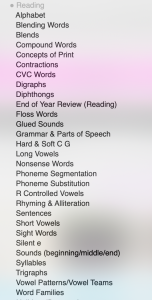
Here are some images of our “search by category” menu. These are our main topics covered. Once you click a topic, you’ll see a lot of games inside. For example, “addition” will have adding +0, adding +1,  addition to 5, adding doubles, 2 digit addition, etc. 
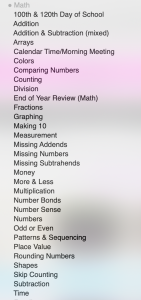
Holiday and Seasonal games list on Fluency & Fitness+

Your membership includes full access to all PreK–3rd grade content in Fluency & Fitness, Fluency Find It, Digital Task Cards, and Physical Phonics. You’ll get thousands of ready-to-play activities, plus the ability to create custom games, save favorites, build playlists, assign activities to students, and track student progress—all in one easy-to-use website.

Absolutely! Fluency & Fitness+ works well for special education, intervention, homeschool, small groups, and differentiated instruction. With PreK–3rd grade content and activities at different skill levels and speeds, you can choose what best matches each student’s needs.

You can have 50 students in your classroom. Each membership is for 1 user only as only 1 person can login under and account. This helps protect student privacy.

The products on TPT are much older, downloadable versions of some of our activities. Fluency & Fitness+ is the current, expanded online version with thousands of activities plus features not available in the TPT products, including multiple activity formats, music, animations, custom games, assignments, playlists, student progress tracking, and more.

TPT purchases are separate from the Fluency & Fitness+ membership and do not include membership access.

USING THE MEMBERSHIP

Yes! You can assign activities directly to students inside Fluency & Fitness+ or share a link to an individual game through Google Classroom, Seesaw, Canvas, or another learning platform. Students can play on their own devices using their login information or the code you provide. If you choose to have students log in, you can also collect and track their data.

  • All you need is a device with a modern web browser and a broadband internet connection that allows the Fluency & Fitness+ website. Activities can be displayed for the whole class on an interactive whiteboard, projector, or classroom display, or students can play on individual devices.

Yes! You can assign activities directly to students through Fluency & Fitness+ and track their progress from your teacher account. Digital Task Cards are self-checking and provide student data, making them great for independent practice, centers, intervention, and progress monitoring.

Yes! Members can create their own Fluency & Fitness®️ and Fluency Find It®️ games using custom text. This is perfect for practicing your own sight words, vocabulary, math facts, spelling words, or other skills your students are currently learning.


The videos range from about 2-6 minutes.  Digital task cards are self-paced.

Yes! Short tunes play on the Fluency & Fitness exercise slides. We do not have background music on any skill slides. This helps students know when to have fun and exercise and when to transition back to learning. Due to copyright laws, we’re still unable to include songs you’d find on the radio. 

PLANS & SCHOOL PURCHASING

Monthly, quarterly, and annual. All plans include the same membership access.

Yes. Individual memberships are licensed to one teacher and should not be shared with colleagues.

We accept purchase orders from schools for the 1 year membership. Purchase orders can be made out to Fluency & Fitness and e-mailed to us. You can use your own form, or use our order form. Here is our w9 form, so your school can set us up as a new vendor. We’ll invoice the school, and set up your account manually. You can pay online via a credit card or mail in a check. Purchase orders do need to be sent in each year in order to keep the membership active.

Yes, we give a discount if you buy 5 or more memberships. Please contact us for more details. We’ll send you a brochure with information and pricing to pass along to your administration. We do accept purchase orders, which would need renewed each year in order to keep the membership active. 

All major credit and debit cards. We also accept school purchase orders. 

School email filters may block payment receipts and important account emails. We recommend using a personal email so you don’t miss important membership information. You can still log in and use Fluency & Fitness+ at school with a personal email address.

SEE WHAT YOU GET AS A MEMBER.

Everything is ready and waiting for you!

Access ALL PreK–3rd grade content
Thousands of ready-to-play activities
Play as a class or assign to students
Save your favorite games & create playlists
Track student progress & view reports
Use on any device, anytime

MANAGING YOUR ACCOUNT

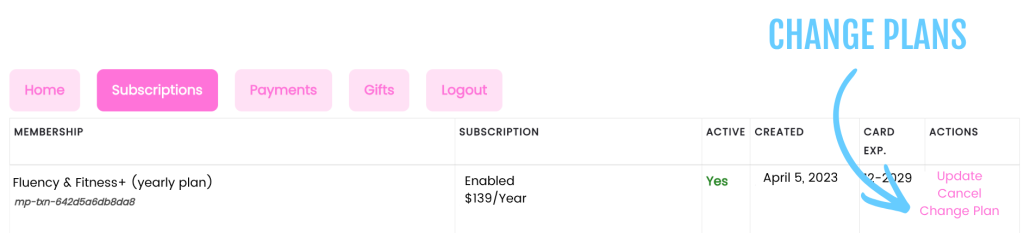
Yes!  Click the Subscriptions tab below. Then you’ll be able to see the option for “change plan” over on the right side. If you’re on a mobile device, the “change plan” will be at the bottom of the box next to the word “actions”. The system will take any money you have left unused on your current plan and put it toward the new plan.  You will need to logout/login so the system sees you have a brand new membership. Your billing period will be reset to the day of your newly purchased membership. For example, if the membership is monthly, and was originally purchased on the 1st the month, but upgraded to yearly on the 15th of the month, the next billing date would be the 15th (the following year) instead of the 1st.
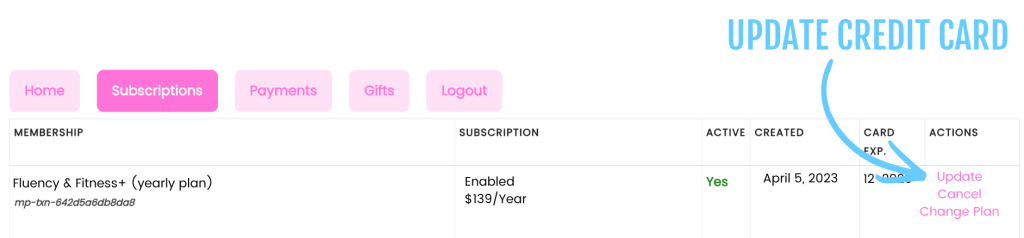
Your membership and access to the Fluency and Fitness®+ will become inactive. Our payment processor will automatically retry a failed payment. You can update your payment method from Subscriptions. If the subscription has already been canceled due to failed payments, you’ll need to select a new membership plan to regain access.
At the bottom of the page, select the Subscriptions tab. There, you will see your plan, your next billing date, and the expiration date of your membership. Select the Payments tab to see any payments you’ve made so far.

Click the Subscriptions tab. Then, on the right side of that box, click Update. If you’re on a mobile device, the “update” will be at the bottom of the box next to the word “actions”.
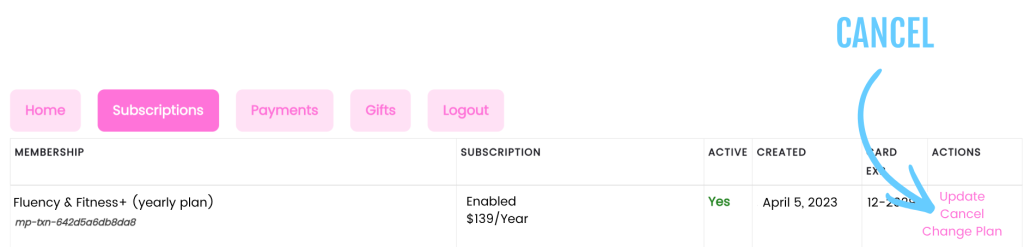
Click the Subscriptions tab. Then, on the right side, click Cancel. If you’re on a mobile device, the “cancel” will be at the bottom of the box next to the word “actions”.

📧You will receive a confirmation email  titled “Your auto billing to Fluency & Fitness+ has stopped”. If you don’t see “cancel” look under the subscription column. If it says “stopped”, then you have already cancelled your plan previously.

You’ll continue to have access through the end of your paid billing period, but no future payments will be charged. Canceling a membership does not automatically refund previous payments. If you have a question about a charge, please contact us and we’ll be happy to help.

STILL HAVE QUESTIONS? CONTACT US:

New members = 14 days for $1    coupon code: BACKTOSCHOOL26

X